

Tegas Logo
AI text to video

Turn your script into a video with AI

Paste a description, a script or a prompt — the AI builds the visuals and adds voiceover, subtitles and music. From text to a finished video in one place: generation and edits without editing from scratch.

Script by Tessa

  1. Scene 1

    🎙 «Five simple habits can win you back an hour a day.»

  2. Scene 2

    🎙 «One: your phone sleeps in the kitchen, so mornings start without the feed.»

  3. Scene 3

    🎙 «Two: lay out your clothes and breakfast the night before, not on the run.»

  4. Scene 4

    🎙 «Three: check your email twice a day, not every five minutes.»

  5. Scene 5

    🎙 «Four: a two-minute task gets done right now, not added to a list.»

  6. Scene 6

    🎙 «Five: put a timer on every meeting, and your hour is yours again.»

Finished video🔇

Text → video

from a description, script or prompt

~3 min

from request to video

6 languages

for voiceover and subtitles

from $30

a month instead of a stack of generators and an editor

How it works

How to turn text into a video in 3 steps

No need to write a separate shooting script, hunt for images and lay a voice over them in an editing app. You give the text — a description, a ready script or a prompt (and photos if you like) — and Tegas prepares the shots, voiceover, subtitles and music. After generation you can refine the scenes and the sound.

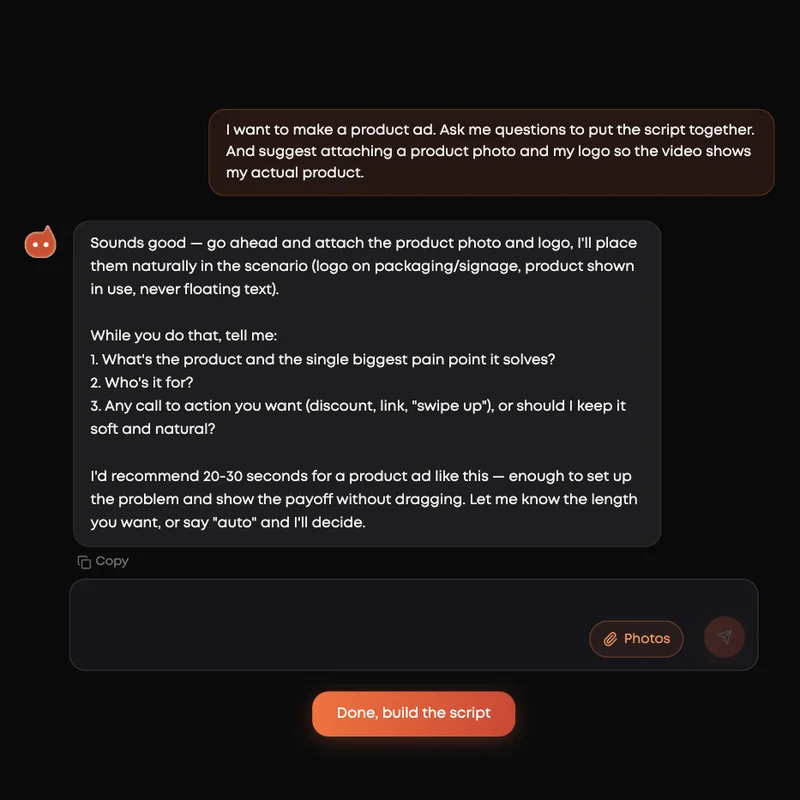
Tegas: a video idea typed for Tessa

Step 01

Paste your text, description or prompt

Write what the video should be about: the topic, scenes, tone and audience. A finished script, a short description or a detailed prompt all work. Attach a photo or a style reference if you like.

Tegas: Tessa asks a few questions before the script

Step 02

Answer Tessa’s questions

Tessa asks who the video is for and how long it should be — or skips the questions and decides herself. You pick the format (9:16, 1:1, 16:9), voice, subtitles and music before launch.

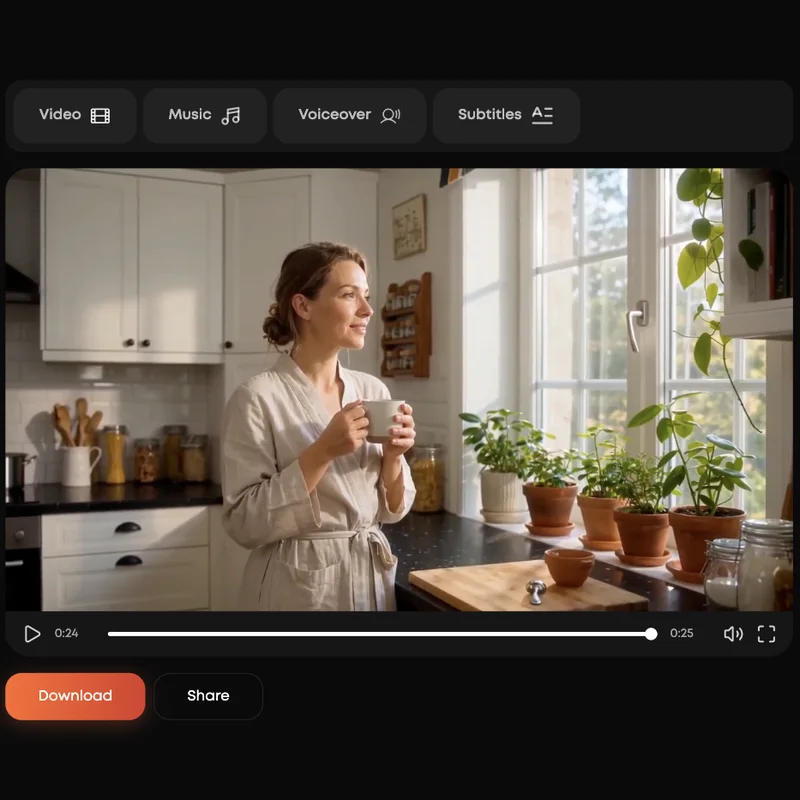
Tegas: the finished video, editor tabs and the Download button

Step 03

Download or refine the result

Get your video. Replace scenes, adjust the voiceover text, change the music and subtitle style — without rebuilding everything from scratch.

Who it’s for

Who the AI script to video generator is for

If you already have text — a post, a script, a prompt or a description — and need to turn it into a video fast, the AI builds the video from your words and materials.

Content and SMM

Social media managers, copywriters, content teams

You have a post or a script and need a video. Paste the text — get a video with voiceover and subtitles.

Marketing and agencies

Marketers, agencies, freelancers

Client briefs and prompts → video drafts. Generate from a description without waiting for a shoot.

Experts and business

Experts, course creators, small businesses

Key points, articles, how-tos → a video. Set the style in the description or attach a reference photo.

Result

What you get from text to video generation

You get a video built from your text, not an empty template: a structure that follows your description, voiceover, subtitles and music. Then publish it or make quick edits.

From text to video

  • →A video from a description, script or prompt
  • →The storyline follows your text
  • →Edit scenes and voiceover after generation

Ready to post

  • →Voiceover in 6 languages
  • →Subtitles and music added automatically
  • →9:16, 1:1 and 16:9 formats

Budget control

  • →No video editor needed for every text
  • →Plans from $30/month
  • →The price is shown before you start

Examples

Videos made with Tegas from text

These videos started as a description or a prompt. This is what “text → finished video” looks like.

tap
Type:
episode from a script
Goal:
episode text → characters, scenes and voice
tap
Type:
ad from a ready script
Goal:
a scene-by-scene script → an ad video
tap
Type:
comedy from narration text
Goal:
narrator text → funny scenes
tap
Type:
series finale
Goal:
story text → the final episode
tap
Type:
cartoon series from one sentence
Goal:
a short text → characters, plot and voice
tap
Type:
service promo from a description
Goal:
product text → an ad video

Comparison

Why people choose Tegas to turn text into video

To make a video from text, it isn’t enough to “draw shots from a phrase” — you need a video with a structure, voiceover and subtitles that you can edit after generation. Here is how Tegas compares with typical AI services and with editing by hand from a script.

All of this is in Tegas

Video from text, a description or a prompt in one place✓
Voiceover and subtitles from your text✓
A finished video, not just “motion from a prompt”✓
Edit the voiceover text and scenes after generation✓
Online in the browser — no local models or editing software✓
Time to the first video from textminutes
Entry costfrom $30/mo

PRICING

Tegas Plans

One set of plans for the whole service, including text and prompt to video. Choose the amount of tokens for the number of videos and edits you need.

−20% for the first 48 hours after sign-up

Active week

$7.50/week

then Active $30/mo, cancel anytime in your profile

Try a week

Everything in Active for 7 days

Best start

Active

Trying it out, a couple of videos a week

$30/mo

500 tokens / month

Get started
  • Script, video, voiceover and music
  • Editing and subtitles
  • No watermark

Pro

Running social media, a video almost every day

$80/mo

1,500 tokens / month

Get started

Everything in Active +

  • 24/7 support

Business

Teams, agencies, many clients

$230/mo

5,000 tokens / month

Get started

Everything in Pro +

  • Personal account manager
  • #1 generation priority

Features

Text to video features in Tegas

Features made for “text or prompt → video”: from reading your description to voiceover, subtitles and edits.

Text, description or prompt as input

A script, a brief or a detailed request.

A storyline from your text

The structure of the video follows what you wrote.

Voiceover in 6 languages

English, Spanish, French, German, Turkish and Russian; preview the voice before you start.

Subtitles and music

For the feed and for watching without sound.

Edits after generation

Scenes, voiceover wording, the track and subtitles.

Formats for every platform

9:16, 1:1, 16:9.

Use cases

What you can do with AI text to video

Text to video works when you already have words — a post, a script, a prompt or a request. Pick the scenario closest to your goal; for narrow formats, use the related tools.

  1. 01

    Post or article → video

    Turn a finished text into a video.

  2. 02

    Prompt with style and scenes

    A detailed description → a video.

  3. 03

    Script → video with voiceover

    Your script is read by an AI voice over matching scenes.

    See also: Video with voiceover →
  4. 04

    Short clip from text for the feed

    A few lines → a vertical clip for Reels, Shorts or TikTok.

  5. 05

    Ad copy → creative

    Your offer and call to action → a video ad.

    See also: AI ad videos →
  6. 06

    Long explainer from a ready outline

    A detailed plan → a longer video, section by section.

FAQ

Frequently asked questions

Yes. Paste a description, a script or a prompt — Tegas builds the visuals, voiceover, subtitles and music. Then you can fine-tune the video.

A general generator covers any video. This page is about text as the input: a description, a prompt, a script or a request. For other tasks, use the general AI video generator.

Many generators make short clips from a phrase, often without a voice or a story. Tegas takes you from text to a finished video with voiceover, subtitles and music in one go, and lets you edit it afterwards.

Both work. A short description sets the idea; a detailed script or prompt gives more control over the scenes and the voiceover. You can start with a short text and refine after generation.

English, Spanish, French, German, Turkish and Russian. Write your text in any of them and choose the voice; you can also dub a finished video into another language.

Plans start at $30/month and include tokens. Usage depends on the length and type of video; Tegas shows the exact price before you start. See the pricing section for details.

Tegas generates a video from text and lets you edit scenes and sound afterwards. It isn’t a full professional editor like Premiere — but it covers the path from text to a finished video without editing from scratch.

Videos made on paid plans (Active and above) have no watermark.

Voiceover focuses on the voice. Short videos focus on Reels and Shorts. Product video works from product photos. Here the core is text — a prompt or a description as the input.

Turn your text into a video with AI now

Paste a description or a prompt — get a video with voiceover, subtitles and music.

AI Script to Video Generator — Text to Video Online | Tegas AI